BlackBerry BlackBox
🖥️ Project Overview
BlackBerry is a global leader in cybersecurity and secure enterprise communication, trusted by governments and regulated industries worldwide. Now a software-first company, BlackBerry no longer manufactures smartphones but builds technologies that protect data, devices, and digital systems.
This project explores BlackBerry’s expansion into the EdTech and collaboration space, using its strengths in secure communication and endpoint management to address growing concerns around student data privacy, security, and digital distraction in hybrid learning.
Positioned as a privacy-first alternative to platforms like Google Classroom and Microsoft Teams, the concept delivers a secure, distraction-free digital classroom—modernizing BlackBerry’s image while staying true to its DNA of trust, professionalism, and security.
Project Goal - The goal of this project is to design a secure and user-friendly digital workspace that supports learning, teaching, and collaboration while protecting user privacy.
🧾 Problem Statement
Students and teachers use too many different apps for classes, messages, assignments, and teamwork. This makes learning confusing and inefficient.
Many education platforms also collect a lot of personal data, which creates privacy and security risks for students, teachers, and institutions.
Current tools lack smart features and automation, making everyday tasks repetitive and limiting personalized learning.
There is a need for one secure, simple, and intelligent platform that protects data and supports focused, effective learning.
🧭 Design Process
Discovery & Framing (Week 1):
Users
Educational institutions: admins, IT teams, faculty, students
Manage sensitive data but use fragmented, distracting tools
Industry & Experience
EdTech | Secure, distraction-free learning
Seamless collaboration across students, teachers, and admins
Opportunity: BlackBerry’s trusted security fills the gap
Current Ecosystem
Digital: LMS, video calls, messaging, email
Physical: Classrooms, campuses
Pain points: tool overload, privacy risks, poor integration
Brand Opportunity
Expand BlackBerry from enterprise security into a privacy-first education ecosystem
Brand Experience Analysis (Week 2):
BlackBerry began in 1984 as Research In Motion (RIM) and became known for secure pagers and smartphones, peaking in 2008. Facing competition from iPhone and Android, it shifted away from hardware and now focuses on enterprise software, cybersecurity, and QNX automotive systems, serving governments, finance, and automotive clients.
The brand communicates mainly through B2B channels, including direct sales, its website, LinkedIn, Twitter/X, YouTube, conferences like RSA and CES, and strategic partnerships. Key touchpoints include support portals, enterprise onboarding, training, embedded software in vehicles, and digital content.
Visually, BlackBerry is defined by dark neutral colors with blue accents, modern sans-serif typography, minimalist patterns, high-tech imagery, flat icons, and smooth interactions, reinforcing security, professionalism, and trust. The brand is highly credible in enterprise and regulated industries, but has limited consumer presence and emotional connection.
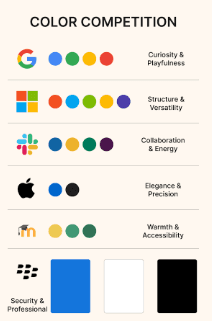
Researched competitors like Microsoft Teams, Zoom, Google Classroom, and Slack. They use bright, playful palettes, while BlackBerry stays dark and professional. This highlights an opportunity to add subtle accent colors to stand out visually without losing trust.
Research & Synthesis (Week 3):
1. Key Stakeholders
Primary: Students, Teachers, IT/Admin Teams
Secondary: Industry Partners, Alumni, Mentors
Tertiary: Privacy Advocates, Regulators, Media/Public
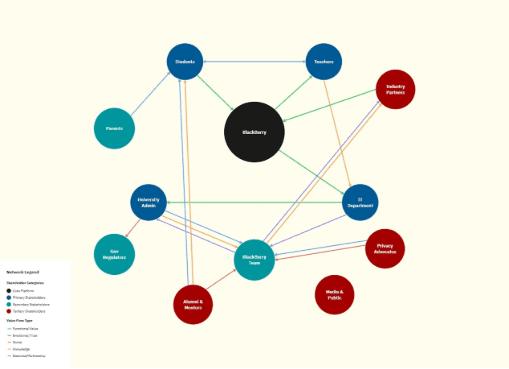
Mapped value, trust, knowledge, social, and business communication flows to understand ecosystem interactions.
(Visual: Stakeholder map with arrows showing relationships and trust/value types.)
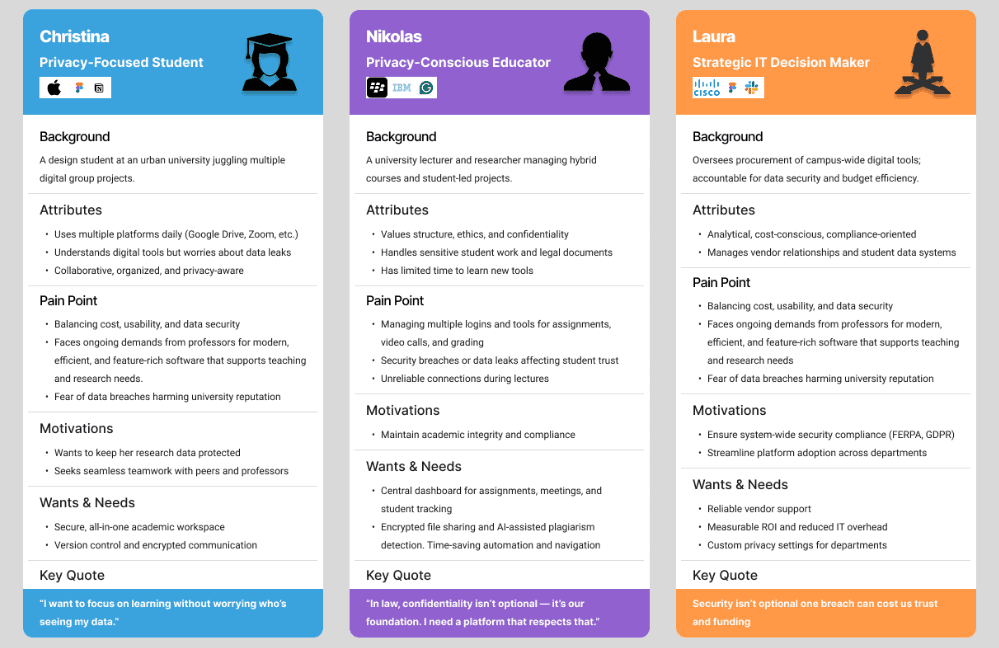
2. Personas
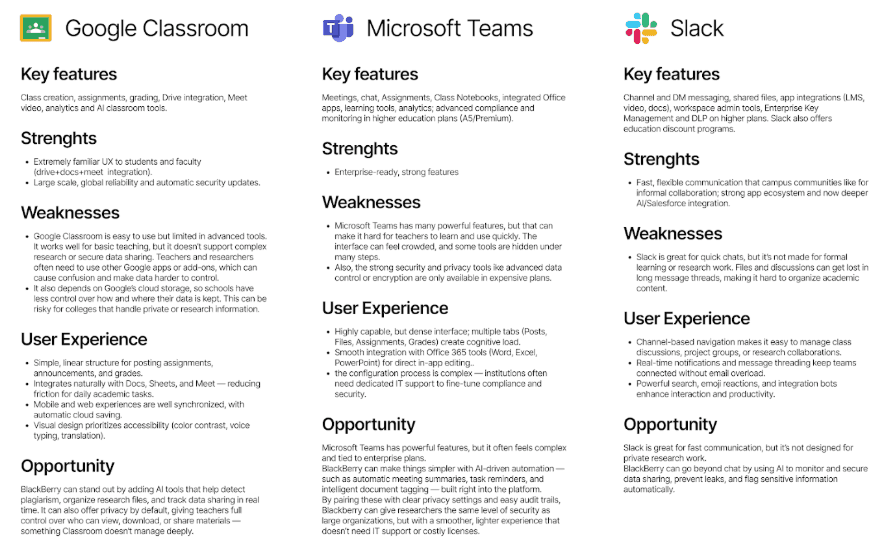
3. Competitive Audit
Google Classroom: Familiar UX, simple but limited advanced tools; opportunity: AI-assisted privacy & research tools.
Microsoft Teams: Powerful but complex; opportunity: simplify workflows, AI-driven automation, privacy-first features.
Slack: Fast communication, informal, but poor for academic workflows; opportunity: secure, structured collaboration with AI moderation.
User Flow Strategy (Week 4):
I mapped the full user experience flow, from onboarding and role-based dashboard setup to courses, meetings, messaging, and community forums. The flow highlights AI-enhanced features like smart recommendations, lesson summaries, predictive scheduling, and study support. I included secure assessments, grading, and a strong focus on data privacy and notifications, as well as profile and settings management. Overall, the week focused on creating a user-centered, secure, and intelligent platform experience for students, teachers, and admins.
Ideation (Week 5 & 6):
I focused on visual design and grid explorations for the BlackBerry platform. I selected key screens from the main project touchpoints and created five different grid variations to explore composition, type hierarchy, imagery, and calls to action. From these, I picked three strongest sketches and redesigned each screen using three distinct grid approaches, ensuring responsive layouts and proper aspect ratios. I designed two screens per direction, totaling six fully realized screens, incorporating the design system, content hierarchy, and imagery. The process emphasized responsive design across multiple screen sizes, alignment with target user needs, and reflection of the platform’s brand attributes.
Experience Strategy (Week 7):
I iterated on the creative brief, personas, value proposition, and competitive landscape for BlackBox Learn, refining the brand attributes to guide visual design decisions. I identified key areas in the user journey through Wavelines and drafted initial design principles tailored to students, educators, and institutions. I expanded the mood board with imagery reflecting the brand’s values of privacy, security, trust, and inclusivity, ensuring the visual language aligned with the platform’s positioning as a privacy-first, user-friendly collaboration ecosystem. Research of competitors like Google Classroom, Moodle, and Slack highlighted opportunities for secure, easy-to-use, and AI-enhanced learning tools, which informed the design strategy. This week focused on defining the brand identity, visual tone, and user experience goals that would drive the next phase of design iterations.
Dynamic Design Strategy (Week 8):
In Week 8, I developed a strategy for using dynamic media in BlackBox Learn, making the platform adapt to user behavior and preferences. Interface elements, animations, and alerts respond to engagement, emphasizing frequently used tools and highlighting urgent actions. Context-aware cues and motion design reinforce security, usability, and learning efficiency, while continuous feedback allows iterative optimization to keep the experience intuitive and user-focused.
Final Delivery (Week 9 & 10):
Prototype, presentation board, interaction demo, reflection Paper.
🧠 Solution
The Ed Tech and hybrid-learning market is booming post-pandemic. Black Berry's secure communication infrastructure can easily scale to manage digital classrooms, campuses, and professional learning networks.
Students get a distraction-free and safe digital classroom for learning and collaboration.
Educators get reliable, easy-to-use tools to teach, manage classes, and communicate.
Institutions get a secure platform that protects user data while supporting hybrid learning at scale.
By combining strong security with a simple user experience, the solution revives BlackBerry’s legacy and positions the brand as a leader in safe, smart, and ethical digital innovation for education.
🤖 AI
The platform integrates AI-powered study tools to enhance learning and productivity. Features include personalized study recommendations, a Learning Pulse tracker to monitor progress, quick actions for tasks, and an AI study companion for on-demand help. Users can also customize notifications, themes, and colors, as well as adjust AI assistance levels and animations, making the experience adaptive, supportive, and tailored to individual preferences.
💡Reflection & Next Step
Reflecting on this project, I gained valuable experience designing a privacy-first, AI-enhanced learning platform from research through high-fidelity prototyping. I learned how to balance user needs, security, and engagement, integrating AI tools like study companions, adaptive recommendations, and context-aware notifications to create an intuitive experience. Iterating through flows, grids, and dynamic media reinforced the importance of responsive design, brand consistency, and user-centered thinking, and helped me understand how to translate complex requirements into clear, actionable design solutions for multiple user roles.
Next, I will test dashboard layouts, add keyboard shortcuts, and enhance AI study features. I will also design a mobile app version to ensure a responsive, user-friendly experience across devices.
🖥️ Project Overview
BlackBerry is a global leader in cybersecurity and secure enterprise communication, trusted by governments and regulated industries worldwide. Now a software-first company, BlackBerry no longer manufactures smartphones but builds technologies that protect data, devices, and digital systems.
This project explores BlackBerry’s expansion into the EdTech and collaboration space, using its strengths in secure communication and endpoint management to address growing concerns around student data privacy, security, and digital distraction in hybrid learning.
Positioned as a privacy-first alternative to platforms like Google Classroom and Microsoft Teams, the concept delivers a secure, distraction-free digital classroom—modernizing BlackBerry’s image while staying true to its DNA of trust, professionalism, and security.
Project Goal - The goal of this project is to design a secure and user-friendly digital workspace that supports learning, teaching, and collaboration while protecting user privacy.
🧾 Problem Statement
Students and teachers use too many different apps for classes, messages, assignments, and teamwork. This makes learning confusing and inefficient.
Many education platforms also collect a lot of personal data, which creates privacy and security risks for students, teachers, and institutions.
Current tools lack smart features and automation, making everyday tasks repetitive and limiting personalized learning.
There is a need for one secure, simple, and intelligent platform that protects data and supports focused, effective learning.
🧭 Design Process
Discovery & Framing (Week 1):
Users
Educational institutions: admins, IT teams, faculty, students
Manage sensitive data but use fragmented, distracting tools
Industry & Experience
EdTech | Secure, distraction-free learning
Seamless collaboration across students, teachers, and admins
Opportunity: BlackBerry’s trusted security fills the gap
Current Ecosystem
Digital: LMS, video calls, messaging, email
Physical: Classrooms, campuses
Pain points: tool overload, privacy risks, poor integration
Brand Opportunity
Expand BlackBerry from enterprise security into a privacy-first education ecosystem
Brand Experience Analysis (Week 2):
BlackBerry began in 1984 as Research In Motion (RIM) and became known for secure pagers and smartphones, peaking in 2008. Facing competition from iPhone and Android, it shifted away from hardware and now focuses on enterprise software, cybersecurity, and QNX automotive systems, serving governments, finance, and automotive clients.
The brand communicates mainly through B2B channels, including direct sales, its website, LinkedIn, Twitter/X, YouTube, conferences like RSA and CES, and strategic partnerships. Key touchpoints include support portals, enterprise onboarding, training, embedded software in vehicles, and digital content.
Visually, BlackBerry is defined by dark neutral colors with blue accents, modern sans-serif typography, minimalist patterns, high-tech imagery, flat icons, and smooth interactions, reinforcing security, professionalism, and trust. The brand is highly credible in enterprise and regulated industries, but has limited consumer presence and emotional connection.
Researched competitors like Microsoft Teams, Zoom, Google Classroom, and Slack. They use bright, playful palettes, while BlackBerry stays dark and professional. This highlights an opportunity to add subtle accent colors to stand out visually without losing trust.
Research & Synthesis (Week 3):
1. Key Stakeholders
Primary: Students, Teachers, IT/Admin Teams
Secondary: Industry Partners, Alumni, Mentors
Tertiary: Privacy Advocates, Regulators, Media/Public
Mapped value, trust, knowledge, social, and business communication flows to understand ecosystem interactions.
(Visual: Stakeholder map with arrows showing relationships and trust/value types.)
2. Personas
3. Competitive Audit
Google Classroom: Familiar UX, simple but limited advanced tools; opportunity: AI-assisted privacy & research tools.
Microsoft Teams: Powerful but complex; opportunity: simplify workflows, AI-driven automation, privacy-first features.
Slack: Fast communication, informal, but poor for academic workflows; opportunity: secure, structured collaboration with AI moderation.
User Flow Strategy (Week 4):
I mapped the full user experience flow, from onboarding and role-based dashboard setup to courses, meetings, messaging, and community forums. The flow highlights AI-enhanced features like smart recommendations, lesson summaries, predictive scheduling, and study support. I included secure assessments, grading, and a strong focus on data privacy and notifications, as well as profile and settings management. Overall, the week focused on creating a user-centered, secure, and intelligent platform experience for students, teachers, and admins.
Ideation (Week 5 & 6):
I focused on visual design and grid explorations for the BlackBerry platform. I selected key screens from the main project touchpoints and created five different grid variations to explore composition, type hierarchy, imagery, and calls to action. From these, I picked three strongest sketches and redesigned each screen using three distinct grid approaches, ensuring responsive layouts and proper aspect ratios. I designed two screens per direction, totaling six fully realized screens, incorporating the design system, content hierarchy, and imagery. The process emphasized responsive design across multiple screen sizes, alignment with target user needs, and reflection of the platform’s brand attributes.
Experience Strategy (Week 7):
I iterated on the creative brief, personas, value proposition, and competitive landscape for BlackBox Learn, refining the brand attributes to guide visual design decisions. I identified key areas in the user journey through Wavelines and drafted initial design principles tailored to students, educators, and institutions. I expanded the mood board with imagery reflecting the brand’s values of privacy, security, trust, and inclusivity, ensuring the visual language aligned with the platform’s positioning as a privacy-first, user-friendly collaboration ecosystem. Research of competitors like Google Classroom, Moodle, and Slack highlighted opportunities for secure, easy-to-use, and AI-enhanced learning tools, which informed the design strategy. This week focused on defining the brand identity, visual tone, and user experience goals that would drive the next phase of design iterations.
Dynamic Design Strategy (Week 8):
In Week 8, I developed a strategy for using dynamic media in BlackBox Learn, making the platform adapt to user behavior and preferences. Interface elements, animations, and alerts respond to engagement, emphasizing frequently used tools and highlighting urgent actions. Context-aware cues and motion design reinforce security, usability, and learning efficiency, while continuous feedback allows iterative optimization to keep the experience intuitive and user-focused.
Final Delivery (Week 9 & 10):
Prototype, presentation board, interaction demo, reflection Paper.
🧠 Solution
The Ed Tech and hybrid-learning market is booming post-pandemic. Black Berry's secure communication infrastructure can easily scale to manage digital classrooms, campuses, and professional learning networks.
Students get a distraction-free and safe digital classroom for learning and collaboration.
Educators get reliable, easy-to-use tools to teach, manage classes, and communicate.
Institutions get a secure platform that protects user data while supporting hybrid learning at scale.
By combining strong security with a simple user experience, the solution revives BlackBerry’s legacy and positions the brand as a leader in safe, smart, and ethical digital innovation for education.
🤖 AI
The platform integrates AI-powered study tools to enhance learning and productivity. Features include personalized study recommendations, a Learning Pulse tracker to monitor progress, quick actions for tasks, and an AI study companion for on-demand help. Users can also customize notifications, themes, and colors, as well as adjust AI assistance levels and animations, making the experience adaptive, supportive, and tailored to individual preferences.
💡Reflection & Next Step
Reflecting on this project, I gained valuable experience designing a privacy-first, AI-enhanced learning platform from research through high-fidelity prototyping. I learned how to balance user needs, security, and engagement, integrating AI tools like study companions, adaptive recommendations, and context-aware notifications to create an intuitive experience. Iterating through flows, grids, and dynamic media reinforced the importance of responsive design, brand consistency, and user-centered thinking, and helped me understand how to translate complex requirements into clear, actionable design solutions for multiple user roles.
Next, I will test dashboard layouts, add keyboard shortcuts, and enhance AI study features. I will also design a mobile app version to ensure a responsive, user-friendly experience across devices.
🖥️ Project Overview
BlackBerry is a global leader in cybersecurity and secure enterprise communication, trusted by governments and regulated industries worldwide. Now a software-first company, BlackBerry no longer manufactures smartphones but builds technologies that protect data, devices, and digital systems.
This project explores BlackBerry’s expansion into the EdTech and collaboration space, using its strengths in secure communication and endpoint management to address growing concerns around student data privacy, security, and digital distraction in hybrid learning.
Positioned as a privacy-first alternative to platforms like Google Classroom and Microsoft Teams, the concept delivers a secure, distraction-free digital classroom—modernizing BlackBerry’s image while staying true to its DNA of trust, professionalism, and security.
Project Goal - The goal of this project is to design a secure and user-friendly digital workspace that supports learning, teaching, and collaboration while protecting user privacy.
🧾 Problem Statement
Students and teachers use too many different apps for classes, messages, assignments, and teamwork. This makes learning confusing and inefficient.
Many education platforms also collect a lot of personal data, which creates privacy and security risks for students, teachers, and institutions.
Current tools lack smart features and automation, making everyday tasks repetitive and limiting personalized learning.
There is a need for one secure, simple, and intelligent platform that protects data and supports focused, effective learning.
🧭 Design Process
Discovery & Framing (Week 1):
Users
Educational institutions: admins, IT teams, faculty, students
Manage sensitive data but use fragmented, distracting tools
Industry & Experience
EdTech | Secure, distraction-free learning
Seamless collaboration across students, teachers, and admins
Opportunity: BlackBerry’s trusted security fills the gap
Current Ecosystem
Digital: LMS, video calls, messaging, email
Physical: Classrooms, campuses
Pain points: tool overload, privacy risks, poor integration
Brand Opportunity
Expand BlackBerry from enterprise security into a privacy-first education ecosystem
Brand Experience Analysis (Week 2):
BlackBerry began in 1984 as Research In Motion (RIM) and became known for secure pagers and smartphones, peaking in 2008. Facing competition from iPhone and Android, it shifted away from hardware and now focuses on enterprise software, cybersecurity, and QNX automotive systems, serving governments, finance, and automotive clients.
The brand communicates mainly through B2B channels, including direct sales, its website, LinkedIn, Twitter/X, YouTube, conferences like RSA and CES, and strategic partnerships. Key touchpoints include support portals, enterprise onboarding, training, embedded software in vehicles, and digital content.
Visually, BlackBerry is defined by dark neutral colors with blue accents, modern sans-serif typography, minimalist patterns, high-tech imagery, flat icons, and smooth interactions, reinforcing security, professionalism, and trust. The brand is highly credible in enterprise and regulated industries, but has limited consumer presence and emotional connection.
Researched competitors like Microsoft Teams, Zoom, Google Classroom, and Slack. They use bright, playful palettes, while BlackBerry stays dark and professional. This highlights an opportunity to add subtle accent colors to stand out visually without losing trust.
Research & Synthesis (Week 3):
1. Key Stakeholders
Primary: Students, Teachers, IT/Admin Teams
Secondary: Industry Partners, Alumni, Mentors
Tertiary: Privacy Advocates, Regulators, Media/Public
Mapped value, trust, knowledge, social, and business communication flows to understand ecosystem interactions.
(Visual: Stakeholder map with arrows showing relationships and trust/value types.)
2. Personas
3. Competitive Audit
Google Classroom: Familiar UX, simple but limited advanced tools; opportunity: AI-assisted privacy & research tools.
Microsoft Teams: Powerful but complex; opportunity: simplify workflows, AI-driven automation, privacy-first features.
Slack: Fast communication, informal, but poor for academic workflows; opportunity: secure, structured collaboration with AI moderation.
User Flow Strategy (Week 4):
I mapped the full user experience flow, from onboarding and role-based dashboard setup to courses, meetings, messaging, and community forums. The flow highlights AI-enhanced features like smart recommendations, lesson summaries, predictive scheduling, and study support. I included secure assessments, grading, and a strong focus on data privacy and notifications, as well as profile and settings management. Overall, the week focused on creating a user-centered, secure, and intelligent platform experience for students, teachers, and admins.
Ideation (Week 5 & 6):
I focused on visual design and grid explorations for the BlackBerry platform. I selected key screens from the main project touchpoints and created five different grid variations to explore composition, type hierarchy, imagery, and calls to action. From these, I picked three strongest sketches and redesigned each screen using three distinct grid approaches, ensuring responsive layouts and proper aspect ratios. I designed two screens per direction, totaling six fully realized screens, incorporating the design system, content hierarchy, and imagery. The process emphasized responsive design across multiple screen sizes, alignment with target user needs, and reflection of the platform’s brand attributes.
Experience Strategy (Week 7):
I iterated on the creative brief, personas, value proposition, and competitive landscape for BlackBox Learn, refining the brand attributes to guide visual design decisions. I identified key areas in the user journey through Wavelines and drafted initial design principles tailored to students, educators, and institutions. I expanded the mood board with imagery reflecting the brand’s values of privacy, security, trust, and inclusivity, ensuring the visual language aligned with the platform’s positioning as a privacy-first, user-friendly collaboration ecosystem. Research of competitors like Google Classroom, Moodle, and Slack highlighted opportunities for secure, easy-to-use, and AI-enhanced learning tools, which informed the design strategy. This week focused on defining the brand identity, visual tone, and user experience goals that would drive the next phase of design iterations.
Dynamic Design Strategy (Week 8):
In Week 8, I developed a strategy for using dynamic media in BlackBox Learn, making the platform adapt to user behavior and preferences. Interface elements, animations, and alerts respond to engagement, emphasizing frequently used tools and highlighting urgent actions. Context-aware cues and motion design reinforce security, usability, and learning efficiency, while continuous feedback allows iterative optimization to keep the experience intuitive and user-focused.
Final Delivery (Week 9 & 10):
Prototype, presentation board, interaction demo, reflection Paper.
🧠 Solution
The Ed Tech and hybrid-learning market is booming post-pandemic. Black Berry's secure communication infrastructure can easily scale to manage digital classrooms, campuses, and professional learning networks.
Students get a distraction-free and safe digital classroom for learning and collaboration.
Educators get reliable, easy-to-use tools to teach, manage classes, and communicate.
Institutions get a secure platform that protects user data while supporting hybrid learning at scale.
By combining strong security with a simple user experience, the solution revives BlackBerry’s legacy and positions the brand as a leader in safe, smart, and ethical digital innovation for education.
🤖 AI
The platform integrates AI-powered study tools to enhance learning and productivity. Features include personalized study recommendations, a Learning Pulse tracker to monitor progress, quick actions for tasks, and an AI study companion for on-demand help. Users can also customize notifications, themes, and colors, as well as adjust AI assistance levels and animations, making the experience adaptive, supportive, and tailored to individual preferences.
💡Reflection & Next Step
Reflecting on this project, I gained valuable experience designing a privacy-first, AI-enhanced learning platform from research through high-fidelity prototyping. I learned how to balance user needs, security, and engagement, integrating AI tools like study companions, adaptive recommendations, and context-aware notifications to create an intuitive experience. Iterating through flows, grids, and dynamic media reinforced the importance of responsive design, brand consistency, and user-centered thinking, and helped me understand how to translate complex requirements into clear, actionable design solutions for multiple user roles.
Next, I will test dashboard layouts, add keyboard shortcuts, and enhance AI study features. I will also design a mobile app version to ensure a responsive, user-friendly experience across devices.