Endermax: Google Sprint – Eye-Tracking VR for Spatial Design
Endermax: Google Sprint – Eye-Tracking VR for Spatial Design
🥽 Project Overview
A Google Design Sprint is a fast, structured process that helps teams solve big problems and test new ideas in just a few days. Instead of spending months planning and building, the sprint helps you move from understanding the problem to creating a working prototype quickly. For our project, it gave us a clear path to explore how an eye-tracking VR tool could help designers and researchers test spaces before they are built.
Going from 0 to 1 was exciting because we started with no prototype or final idea, only a question: How can we track user attention and behavior in a large public space? During the sprint, we sketched ideas, studied user needs, and made quick decisions. By the end, we built a simple working demo that we could actually test with real users. This helped us learn what worked, what was confusing and what to improve next.
Our inspiration came from today’s VR technologies like Meta Quest Pro and Apple Vision Pro, as well as real-world problems in architecture, wayfinding, and usability testing. We also learned interesting facts like how eye movements can reveal most of what a user notices, or how VR testing can help reduce mistakes before construction begins. These insights guided our design decisions and showed us how powerful early testing can be.
Interesting Data Points / Statistics
Teams can go from idea to prototype in just 5 days, instead of months of development.
Eye-tracking research has shown that fixation, saccades, and dwell times can reveal 60–80% of user attention patterns.
Rapid testing allows teams to validate assumptions early, preventing wasted effort on solutions that may not meet user needs.
VR usability testing often requires calibration and comfort adjustments for 100% of participants, highlighting hardware limitations as a critical factor.
🧾 Problem Statement
Designers and clients often don’t know how people will move, look around or find their way in a space until it’s already built. This leads to confusion, late changes, and mistakes especially in big places like hospitals or museums. There isn’t an easy tool to test spaces early or see what people notice first. Our project aims to solve this by creating a simple service that shows where users look, how they feel, and how they navigate a space before construction begins.
🤝Role & Contribution
We collaborated as two interaction design students on the project, focusing on research, prototyping, and user experience.
My contributions:
Conducted user research and testing to understand needs and behaviors
Designed features and interactions to make the system simple and efficient for users
Worked on UI design, visual look, and feel of the interface
Helped create the final presentation, communicating design decisions clearly
👥Caveat
If I was working with a larger team that included product managers, engineers, marketing, and sales, I would make the process very organized and collaborative. I would set up short check-ins so everyone stays aligned, share clear updates so each team knows what decisions were made and use simple visuals or prototypes to explain design ideas quickly. I would also listen to their feedback early, understand their goals, and bring everyone together to agree on priorities. This way, the whole team can move in the same direction without confusion.
🧭 Timeline & Sprint Process
(Monday) Week 1 — Problem Framing & Goal Setting
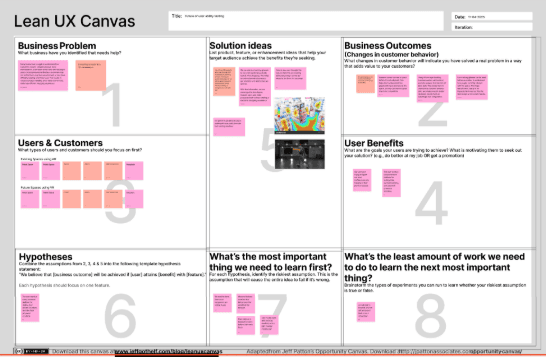
We began by defining the challenge: understanding how users navigate large public spaces and how attention and emotions affect their experience. Using the UX Canvas, we scoped the problem, mapped target customers (experience architects), and identified key questions. Businesses struggle to see how people interact with layouts, signage, and wayfinding, which can reduce usability, safety, and sales.
Hypothesis & Solution Ideas:
Users want a platform to test both existing and proposed spaces.
Use VR/AR and eye-tracking to visualize attention and emotional responses.
Overlay heatmaps on 3D models, integrate Matterport scans, and optimize layouts based on insights.
Expected outcomes: better design decisions, improved user experience, and competitive advantage.
(Tuesday) Week 2 — Research & Insights
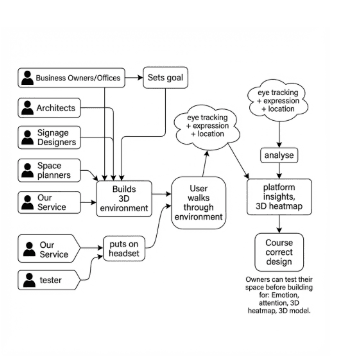
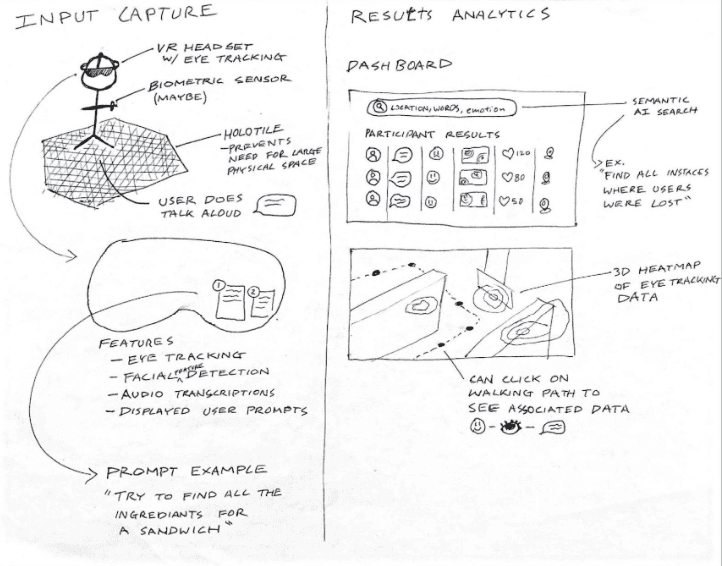
This week, we reviewed competitor products and gathered inspiration from other domains to generate ideas for our VR user testing platform. A screener survey was created to recruit experienced architects, and expert interviews helped validate assumptions and uncover design opportunities. From our ideation sketches, we narrowed down two main concepts: one focusing on VR testing interactions and the other on how results are presented. In the VR concept, participants navigate a 3D space on the Disney Holotile, while eye-tracking, facial expressions, gaze direction, and think-aloud audio capture insights.
(Wednesday) Week 3 — Ideation & Concept Development
Using a Sticky Decision process, we voted on the best solution to prototype.
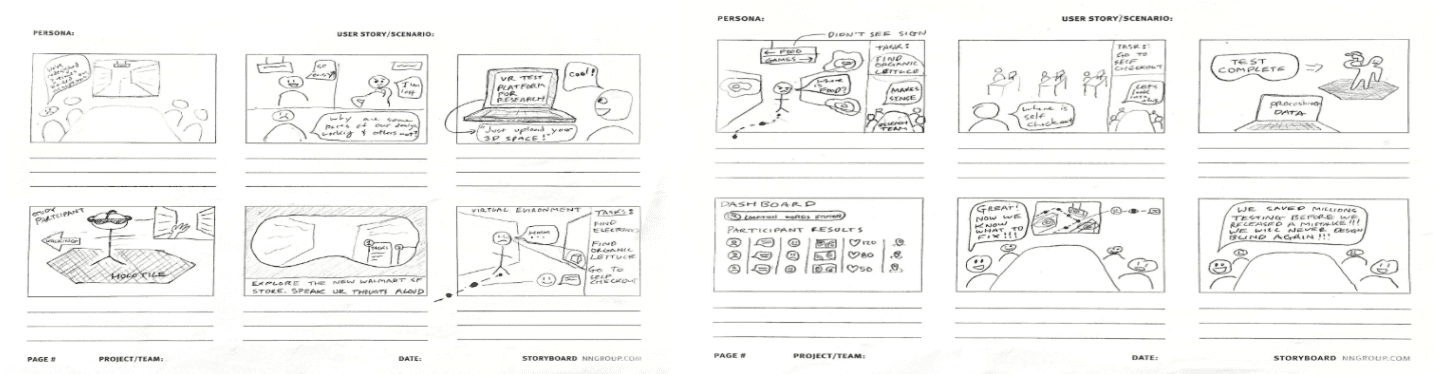
After choosing the concept, we defined the MVP for our VR testing platform. Key features included: a simple 3D environment of the Walmart SF store, Holotile walking integration for natural movement, task-based navigation with clear prompts, “You Are Here” orientation cues, and basic data tracking (task time, path, hesitation points, facial expressions). We also included think-aloud audio capture, a safety and comfort layer, a basic results dashboard for researchers, and minimal VR UI for users. Finally, we created storyboards to visualize user flow, showing how participants navigate the environment, complete tasks, and generate actionable insights. Based on our ideation sketches, we narrowed down to two main concepts: one focusing on how VR testing works, and the other on how results are presented.
In the VR testing concept, a person stands on the Disney Imagineering Holotile wearing a VR headset and navigates a 3D model of a public space to complete wayfinding tasks. While they move naturally on the Holotile, the headset captures facial expressions, eye-tracking data, gaze direction, and think-aloud commentary, giving researchers insights into user attention, confusion points, and emotional reactions.
(Thursday) Week 4 — Prototyping
We built a medium-fidelity prototype on Endermax.com. Material Design principles ensured consistent UI, and AI UX features like emotion tracking, gaze analysis, and task-focused prompts supported qualitative insights. Navigation was guided with clear instructions and a “You Are Here” minimap. The prototype was ready for usability testing, allowing us to validate task flow, user clarity, and collect real feedback.
(Friday) Week 5 — User Testing & Refinement
We conducted usability testing with participants using our VR prototype on Endermax.com. Participants completed navigation tasks while thinking aloud, and we captured eye-tracking, facial expressions, paths, and task metrics.
Key Learnings: VR helps clients understand spaces before construction, wayfinding is often overlooked, and first-person perspective is most intuitive. A simple, realistic interface improves usability, and integration with common design tools is important.
Outcome: The study provided actionable feedback to refine interactions, improve the results dashboard, and confirm the platform’s real-world value for spatial design and client communication.
🚀 Solution — From Start to Finish
We started by exploring user behavior in public spaces through research, competitor analysis, and expert interviews. Multiple concepts were ideated and narrowed down via a Sticky Decision process, focusing on VR interactions and results presentation.
The medium-fidelity prototype on https://endermax.com included 3D navigation, Holotile walking, task-based prompts, and a results dashboard. Usability testing confirmed which features were intuitive and valuable, guiding final refinements for practical use in spatial design projects.
🤖 AI
We explored AI to enhance the insights from eye-tracking data. This included using AI to automatically detect patterns in user gaze, engagement, and emotional responses. We experimented with predictive analytics to anticipate areas of interest and cognitive load. In terms of AI UX patterns, we used progressive disclosure to show insights gradually and contextual assistance to highlight key observations without overwhelming users, ensuring the tool remained intuitive and actionable.
🛠️ Prototyping
During the prototyping phase of Endermax, we focused on creating a clean, intuitive, and visually appealing interface to enhance the user experience. Our design decisions prioritized clarity, ease of navigation, and consistent visual hierarchy. We explored different layouts, information architecture, and UI components, while also considering AI-assisted features for personalized recommendations and smart browsing.
One of the key design explorations was using a flat orthographic view to display products clearly. For example, we included:
"Flat orthographic view of 4 white grocery shelves against gray background, no perspective. Clean product display photography style. Each shelf shows [a misted vegetable section with carrots, broccoli, zucchini, onions, bell peppers, and more,] neatly arranged in rows with price tags visible below each product group. Even studio lighting, no shadows."
This layout ensured all products were visible at a glance, making the AI-enhanced shopping experience intuitive and visually consistent. The prototype evolved based on user feedback, usability testing, and heuristic evaluations, refining elements like product grouping, labeling, and AI UX interactions to support seamless browsing and decision-making across devices.
🧾 Research
For EnderMax, we focused on making a VR eye-tracking experience that was easy to use and understand. We organized the steps clearly: onboarding, calibration, doing tasks, and giving feedback. The interface used simple icons, colors, and text to show where users were looking and their emotions. We also added AI features to show gaze patterns and attention in real time, making the experience more interactive.
Our design decisions aimed to make the experience smooth and intuitive. We worked on the UX flow, information structure, and layout so users could move through the session without confusion. The UI was clean and consistent, with clear visuals for eye-tracking data and emotion indicators.
The prototype changed a lot as we went along. At first, it was just basic screens showing steps, but later we added interactive VR elements like heatmaps and gaze simulations. Each update made it more realistic and helpful, showing how EnderMax could give clear insights about user attention and behavior in VR.
💡Reflection
This project helped us understand how powerful VR can be for testing real-world spaces, but also how many practical challenges still exist, especially around eye-tracking accuracy, facial expression tracking, and user comfort. Our interview with Pietro showed us that wayfinding, signage, and usability problems are extremely common in real environments, and that a tool like EnderMax could meaningfully improve design decisions before construction. Usability testing also reminded us to keep the interface simple, realistic, and easy for new users.
🥽 Project Overview
A Google Design Sprint is a fast, structured process that helps teams solve big problems and test new ideas in just a few days. Instead of spending months planning and building, the sprint helps you move from understanding the problem to creating a working prototype quickly. For our project, it gave us a clear path to explore how an eye-tracking VR tool could help designers and researchers test spaces before they are built.
Going from 0 to 1 was exciting because we started with no prototype or final idea, only a question: How can we track user attention and behavior in a large public space? During the sprint, we sketched ideas, studied user needs, and made quick decisions. By the end, we built a simple working demo that we could actually test with real users. This helped us learn what worked, what was confusing and what to improve next.
Our inspiration came from today’s VR technologies like Meta Quest Pro and Apple Vision Pro, as well as real-world problems in architecture, wayfinding, and usability testing. We also learned interesting facts like how eye movements can reveal most of what a user notices, or how VR testing can help reduce mistakes before construction begins. These insights guided our design decisions and showed us how powerful early testing can be.
Interesting Data Points / Statistics
Teams can go from idea to prototype in just 5 days, instead of months of development.
Eye-tracking research has shown that fixation, saccades, and dwell times can reveal 60–80% of user attention patterns.
Rapid testing allows teams to validate assumptions early, preventing wasted effort on solutions that may not meet user needs.
VR usability testing often requires calibration and comfort adjustments for 100% of participants, highlighting hardware limitations as a critical factor.
🧾 Problem Statement
Designers and clients often don’t know how people will move, look around or find their way in a space until it’s already built. This leads to confusion, late changes, and mistakes especially in big places like hospitals or museums. There isn’t an easy tool to test spaces early or see what people notice first. Our project aims to solve this by creating a simple service that shows where users look, how they feel, and how they navigate a space before construction begins.
🤝Role & Contribution
We collaborated as two interaction design students on the project, focusing on research, prototyping, and user experience.
My contributions:
Conducted user research and testing to understand needs and behaviors
Designed features and interactions to make the system simple and efficient for users
Worked on UI design, visual look, and feel of the interface
Helped create the final presentation, communicating design decisions clearly
👥Caveat
If I was working with a larger team that included product managers, engineers, marketing, and sales, I would make the process very organized and collaborative. I would set up short check-ins so everyone stays aligned, share clear updates so each team knows what decisions were made and use simple visuals or prototypes to explain design ideas quickly. I would also listen to their feedback early, understand their goals, and bring everyone together to agree on priorities. This way, the whole team can move in the same direction without confusion.
🧭 Timeline & Sprint Process
(Monday) Week 1 — Problem Framing & Goal Setting
We began by defining the challenge: understanding how users navigate large public spaces and how attention and emotions affect their experience. Using the UX Canvas, we scoped the problem, mapped target customers (experience architects), and identified key questions. Businesses struggle to see how people interact with layouts, signage, and wayfinding, which can reduce usability, safety, and sales.
Hypothesis & Solution Ideas:
Users want a platform to test both existing and proposed spaces.
Use VR/AR and eye-tracking to visualize attention and emotional responses.
Overlay heatmaps on 3D models, integrate Matterport scans, and optimize layouts based on insights.
Expected outcomes: better design decisions, improved user experience, and competitive advantage.
(Tuesday) Week 2 — Research & Insights
This week, we reviewed competitor products and gathered inspiration from other domains to generate ideas for our VR user testing platform. A screener survey was created to recruit experienced architects, and expert interviews helped validate assumptions and uncover design opportunities. From our ideation sketches, we narrowed down two main concepts: one focusing on VR testing interactions and the other on how results are presented. In the VR concept, participants navigate a 3D space on the Disney Holotile, while eye-tracking, facial expressions, gaze direction, and think-aloud audio capture insights.
(Wednesday) Week 3 — Ideation & Concept Development
Using a Sticky Decision process, we voted on the best solution to prototype.
After choosing the concept, we defined the MVP for our VR testing platform. Key features included: a simple 3D environment of the Walmart SF store, Holotile walking integration for natural movement, task-based navigation with clear prompts, “You Are Here” orientation cues, and basic data tracking (task time, path, hesitation points, facial expressions). We also included think-aloud audio capture, a safety and comfort layer, a basic results dashboard for researchers, and minimal VR UI for users. Finally, we created storyboards to visualize user flow, showing how participants navigate the environment, complete tasks, and generate actionable insights. Based on our ideation sketches, we narrowed down to two main concepts: one focusing on how VR testing works, and the other on how results are presented.
In the VR testing concept, a person stands on the Disney Imagineering Holotile wearing a VR headset and navigates a 3D model of a public space to complete wayfinding tasks. While they move naturally on the Holotile, the headset captures facial expressions, eye-tracking data, gaze direction, and think-aloud commentary, giving researchers insights into user attention, confusion points, and emotional reactions.
(Thursday) Week 4 — Prototyping
We built a medium-fidelity prototype on Endermax.com. Material Design principles ensured consistent UI, and AI UX features like emotion tracking, gaze analysis, and task-focused prompts supported qualitative insights. Navigation was guided with clear instructions and a “You Are Here” minimap. The prototype was ready for usability testing, allowing us to validate task flow, user clarity, and collect real feedback.
(Friday) Week 5 — User Testing & Refinement
We conducted usability testing with participants using our VR prototype on Endermax.com. Participants completed navigation tasks while thinking aloud, and we captured eye-tracking, facial expressions, paths, and task metrics.
Key Learnings: VR helps clients understand spaces before construction, wayfinding is often overlooked, and first-person perspective is most intuitive. A simple, realistic interface improves usability, and integration with common design tools is important.
Outcome: The study provided actionable feedback to refine interactions, improve the results dashboard, and confirm the platform’s real-world value for spatial design and client communication.
🚀 Solution — From Start to Finish
We started by exploring user behavior in public spaces through research, competitor analysis, and expert interviews. Multiple concepts were ideated and narrowed down via a Sticky Decision process, focusing on VR interactions and results presentation.
The medium-fidelity prototype on https://endermax.com included 3D navigation, Holotile walking, task-based prompts, and a results dashboard. Usability testing confirmed which features were intuitive and valuable, guiding final refinements for practical use in spatial design projects.
🤖 AI
We explored AI to enhance the insights from eye-tracking data. This included using AI to automatically detect patterns in user gaze, engagement, and emotional responses. We experimented with predictive analytics to anticipate areas of interest and cognitive load. In terms of AI UX patterns, we used progressive disclosure to show insights gradually and contextual assistance to highlight key observations without overwhelming users, ensuring the tool remained intuitive and actionable.
🛠️ Prototyping
During the prototyping phase of Endermax, we focused on creating a clean, intuitive, and visually appealing interface to enhance the user experience. Our design decisions prioritized clarity, ease of navigation, and consistent visual hierarchy. We explored different layouts, information architecture, and UI components, while also considering AI-assisted features for personalized recommendations and smart browsing.
One of the key design explorations was using a flat orthographic view to display products clearly. For example, we included:
"Flat orthographic view of 4 white grocery shelves against gray background, no perspective. Clean product display photography style. Each shelf shows [a misted vegetable section with carrots, broccoli, zucchini, onions, bell peppers, and more,] neatly arranged in rows with price tags visible below each product group. Even studio lighting, no shadows."
This layout ensured all products were visible at a glance, making the AI-enhanced shopping experience intuitive and visually consistent. The prototype evolved based on user feedback, usability testing, and heuristic evaluations, refining elements like product grouping, labeling, and AI UX interactions to support seamless browsing and decision-making across devices.
🧾 Research
For EnderMax, we focused on making a VR eye-tracking experience that was easy to use and understand. We organized the steps clearly: onboarding, calibration, doing tasks, and giving feedback. The interface used simple icons, colors, and text to show where users were looking and their emotions. We also added AI features to show gaze patterns and attention in real time, making the experience more interactive.
Our design decisions aimed to make the experience smooth and intuitive. We worked on the UX flow, information structure, and layout so users could move through the session without confusion. The UI was clean and consistent, with clear visuals for eye-tracking data and emotion indicators.
The prototype changed a lot as we went along. At first, it was just basic screens showing steps, but later we added interactive VR elements like heatmaps and gaze simulations. Each update made it more realistic and helpful, showing how EnderMax could give clear insights about user attention and behavior in VR.
💡Reflection
This project helped us understand how powerful VR can be for testing real-world spaces, but also how many practical challenges still exist, especially around eye-tracking accuracy, facial expression tracking, and user comfort. Our interview with Pietro showed us that wayfinding, signage, and usability problems are extremely common in real environments, and that a tool like EnderMax could meaningfully improve design decisions before construction. Usability testing also reminded us to keep the interface simple, realistic, and easy for new users.
🥽 Project Overview
A Google Design Sprint is a fast, structured process that helps teams solve big problems and test new ideas in just a few days. Instead of spending months planning and building, the sprint helps you move from understanding the problem to creating a working prototype quickly. For our project, it gave us a clear path to explore how an eye-tracking VR tool could help designers and researchers test spaces before they are built.
Going from 0 to 1 was exciting because we started with no prototype or final idea, only a question: How can we track user attention and behavior in a large public space? During the sprint, we sketched ideas, studied user needs, and made quick decisions. By the end, we built a simple working demo that we could actually test with real users. This helped us learn what worked, what was confusing and what to improve next.
Our inspiration came from today’s VR technologies like Meta Quest Pro and Apple Vision Pro, as well as real-world problems in architecture, wayfinding, and usability testing. We also learned interesting facts like how eye movements can reveal most of what a user notices, or how VR testing can help reduce mistakes before construction begins. These insights guided our design decisions and showed us how powerful early testing can be.
Interesting Data Points / Statistics
Teams can go from idea to prototype in just 5 days, instead of months of development.
Eye-tracking research has shown that fixation, saccades, and dwell times can reveal 60–80% of user attention patterns.
Rapid testing allows teams to validate assumptions early, preventing wasted effort on solutions that may not meet user needs.
VR usability testing often requires calibration and comfort adjustments for 100% of participants, highlighting hardware limitations as a critical factor.
🧾 Problem Statement
Designers and clients often don’t know how people will move, look around or find their way in a space until it’s already built. This leads to confusion, late changes, and mistakes especially in big places like hospitals or museums. There isn’t an easy tool to test spaces early or see what people notice first. Our project aims to solve this by creating a simple service that shows where users look, how they feel, and how they navigate a space before construction begins.
🤝Role & Contribution
We collaborated as two interaction design students on the project, focusing on research, prototyping, and user experience.
My contributions:
Designed features and interactions to make the system simple and efficient for users.
Worked on UI design, visual look, and feel of the interface.
Helped create the final presentation, communicating design decisions clearly.
Conducted user research and testing to understand needs and behaviors
👥Caveat
If I was working with a larger team that included product managers, engineers, marketing, and sales, I would make the process very organized and collaborative. I would set up short check-ins so everyone stays aligned, share clear updates so each team knows what decisions were made and use simple visuals or prototypes to explain design ideas quickly. I would also listen to their feedback early, understand their goals, and bring everyone together to agree on priorities. This way, the whole team can move in the same direction without confusion.
🧭 Timeline & Sprint Process
(Monday) Week 1 — Problem Framing & Goal Setting
We began by defining the challenge: understanding how users navigate large public spaces and how attention and emotions affect their experience. Using the UX Canvas, we scoped the problem, mapped target customers (experience architects), and identified key questions. Businesses struggle to see how people interact with layouts, signage, and wayfinding, which can reduce usability, safety, and sales.
Hypothesis & Solution Ideas:
Users want a platform to test both existing and proposed spaces.
Use VR/AR and eye-tracking to visualize attention and emotional responses.
Overlay heatmaps on 3D models, integrate Matterport scans, and optimize layouts based on insights.
Expected outcomes: better design decisions, improved user experience, and competitive advantage.
(Tuesday) Week 2 — Research & Insights
This week, we reviewed competitor products and gathered inspiration from other domains to generate ideas for our VR user testing platform. A screener survey was created to recruit experienced architects, and expert interviews helped validate assumptions and uncover design opportunities. From our ideation sketches, we narrowed down two main concepts: one focusing on VR testing interactions and the other on how results are presented. In the VR concept, participants navigate a 3D space on the Disney Holotile, while eye-tracking, facial expressions, gaze direction, and think-aloud audio capture insights.
(Wednesday) Week 3 — Ideation & Concept Development
Using a Sticky Decision process, we voted on the best solution to prototype.
After choosing the concept, we defined the MVP for our VR testing platform. Key features included: a simple 3D environment of the Walmart SF store, Holotile walking integration for natural movement, task-based navigation with clear prompts, “You Are Here” orientation cues, and basic data tracking (task time, path, hesitation points, facial expressions). We also included think-aloud audio capture, a safety and comfort layer, a basic results dashboard for researchers, and minimal VR UI for users. Finally, we created storyboards to visualize user flow, showing how participants navigate the environment, complete tasks, and generate actionable insights. Based on our ideation sketches, we narrowed down to two main concepts: one focusing on how VR testing works, and the other on how results are presented.
In the VR testing concept, a person stands on the Disney Imagineering Holotile wearing a VR headset and navigates a 3D model of a public space to complete wayfinding tasks. While they move naturally on the Holotile, the headset captures facial expressions, eye-tracking data, gaze direction, and think-aloud commentary, giving researchers insights into user attention, confusion points, and emotional reactions.
(Thursday) Week 4 — Prototyping
We built a medium-fidelity prototype on Endermax.com. Material Design principles ensured consistent UI, and AI UX features like emotion tracking, gaze analysis, and task-focused prompts supported qualitative insights. Navigation was guided with clear instructions and a “You Are Here” minimap. The prototype was ready for usability testing, allowing us to validate task flow, user clarity, and collect real feedback.
(Friday) Week 5 — User Testing & Refinement
We conducted usability testing with participants using our VR prototype on Endermax.com. Participants completed navigation tasks while thinking aloud, and we captured eye-tracking, facial expressions, paths, and task metrics.
Key Learnings: VR helps clients understand spaces before construction, wayfinding is often overlooked, and first-person perspective is most intuitive. A simple, realistic interface improves usability, and integration with common design tools is important.
Outcome: The study provided actionable feedback to refine interactions, improve the results dashboard, and confirm the platform’s real-world value for spatial design and client communication.
🚀 Solution — From Start to Finish
We started by exploring user behavior in public spaces through research, competitor analysis, and expert interviews. Multiple concepts were ideated and narrowed down via a Sticky Decision process, focusing on VR interactions and results presentation.
The medium-fidelity prototype on https://endermax.com included 3D navigation, Holotile walking, task-based prompts, and a results dashboard. Usability testing confirmed which features were intuitive and valuable, guiding final refinements for practical use in spatial design projects.
🤖 AI
We explored AI to enhance the insights from eye-tracking data. This included using AI to automatically detect patterns in user gaze, engagement, and emotional responses. We experimented with predictive analytics to anticipate areas of interest and cognitive load. In terms of AI UX patterns, we used progressive disclosure to show insights gradually and contextual assistance to highlight key observations without overwhelming users, ensuring the tool remained intuitive and actionable.
🛠️ Prototyping
During the prototyping phase of Endermax, we focused on creating a clean, intuitive, and visually appealing interface to enhance the user experience. Our design decisions prioritized clarity, ease of navigation, and consistent visual hierarchy. We explored different layouts, information architecture, and UI components, while also considering AI-assisted features for personalized recommendations and smart browsing.
One of the key design explorations was using a flat orthographic view to display products clearly. For example, we included:
"Flat orthographic view of 4 white grocery shelves against gray background, no perspective. Clean product display photography style. Each shelf shows [a misted vegetable section with carrots, broccoli, zucchini, onions, bell peppers, and more,] neatly arranged in rows with price tags visible below each product group. Even studio lighting, no shadows."
This layout ensured all products were visible at a glance, making the AI-enhanced shopping experience intuitive and visually consistent. The prototype evolved based on user feedback, usability testing, and heuristic evaluations, refining elements like product grouping, labeling, and AI UX interactions to support seamless browsing and decision-making across devices.
🧾 Research
For EnderMax, we focused on making a VR eye-tracking experience that was easy to use and understand. We organized the steps clearly: onboarding, calibration, doing tasks, and giving feedback. The interface used simple icons, colors, and text to show where users were looking and their emotions. We also added AI features to show gaze patterns and attention in real time, making the experience more interactive.
Our design decisions aimed to make the experience smooth and intuitive. We worked on the UX flow, information structure, and layout so users could move through the session without confusion. The UI was clean and consistent, with clear visuals for eye-tracking data and emotion indicators.
The prototype changed a lot as we went along. At first, it was just basic screens showing steps, but later we added interactive VR elements like heatmaps and gaze simulations. Each update made it more realistic and helpful, showing how EnderMax could give clear insights about user attention and behavior in VR.
💡Reflection
This project helped us understand how powerful VR can be for testing real-world spaces, but also how many practical challenges still exist, especially around eye-tracking accuracy, facial expression tracking, and user comfort. Our interview with Pietro showed us that wayfinding, signage, and usability problems are extremely common in real environments, and that a tool like EnderMax could meaningfully improve design decisions before construction. Usability testing also reminded us to keep the interface simple, realistic, and easy for new users.