🚍 Project Overview
The Mission Bay Shuttle connects UCSF campuses, housing, and public transit in San Francisco, but its user experience is confusing and unreliable. Riders face anxiety around where to board, when to get off, and how accurate real-time tracking is. The absence of clear signage, inconsistent app data, and limited accessibility features made the shuttle difficult to navigate — especially for first-time users, visitors, and people with special needs.
Project Goal: Redesign the shuttle system to reduce user anxiety and increase confidence by improving clarity, real-time feedback, and inclusivity across the end-to-end shuttle experience before, during, and after the journey.
🧾 Problem Statement
Real-time shuttle tracking is unreliable, creating stress.
Lack of accessible signage and inclusive features makes the shuttle hard to navigate, especially for first-time users, visitors, and people with special needs.
Riders are unsure where to board or when to get off.
Design Challenge: How might we create a shuttle experience that is clear, safe, and inclusive for all users?
🤝Role & Contribution
We collaborated as three interaction design students focused on improving the Mission Bay Shuttle experience through research, ideation, and prototyping.
My contributions focused on:
Supported concept development and user journey refinement.
Proposed the “Emergency Contact” feature to address users’ sense of safety and accessibility needs while traveling.
Served as note taker during hallway testing, capturing user reactions and synthesizing key feedback for iteration.
Defined user flows for the digital–physical experience.
Contributed to ideation sessions, shaping user-centered features and interaction patterns.
Designed and refined mid- and high-fidelity prototypes to validate interactions and system clarity.
Created and helped in the final presentation, effectively communicating our design rationale and process to faculty and peers.
🧭 Design Process
Discovery & Empathy (Week 1):
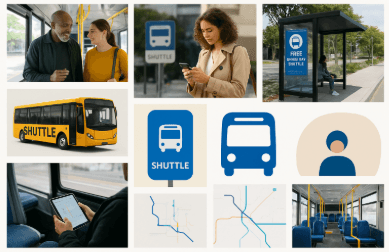
Created a mood board to capture user emotions, environment, visual cues, and experiential insights gathered during observation.
Conducted shuttle observations to understand user behavior, movement patterns, and pain points in real contexts.
Research & Synthesis (Week 2):
Created 6 personas representing diverse riders
Definition & Strategy (Week 3):
Design brief, project map, user flows
Ideation & Decision (Week 4):
Explored AR navigation, vibration/light alerts, emergency contact
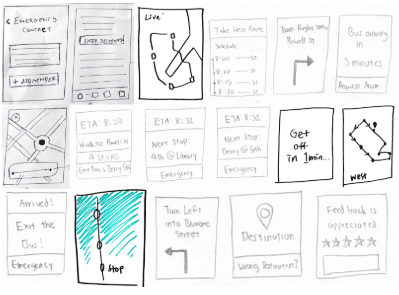
Sketched low-fidelity prototypes
Hallway Testing (Week 5):
Collected feedback on clarity, accessibility, trust
During hallway testing, users shared important feedback about the current and new Mission Bay Shuttle experience. Many people said that the live tracking is often wrong and that it is hard to know where or when to get on or off the shuttle. Because there are no clear visual signs, users felt unsure during their trips, especially in busy or unfamiliar areas.
Several users said that accurate live updates and early information about route changes or delays would make them trust the service more. They liked the idea of using lights or visual signals to show when it is time to get off, especially for those who do not want to look at their phones while traveling.
The emergency assistance feature was seen as helpful, but users felt it should be optional and simple to use. A few users also liked the idea of using AR navigation to find stops and get directions after leaving the shuttle.
Overall, hallway testing showed that clear information, reliable tracking, and easy-to-understand feedback are the most important factors for making riders feel safe and confident while using public transport.
Prototyping (Week 6):
Medium-to-high fidelity Figma prototypes
In the visual design phase, we refined typography, colors, and layouts for clear readability in outdoor settings. Interactive elements, transitions, and animations were added in Figma to mimic real-time feedback. Accessibility checks ensured legible text, easy-to-tap buttons, and inclusive color choices. The prototypes also showed system feedback, such as “approaching stop” alerts and emergency notifications, making the experience feel realistic and responsive.
Final Delivery (Week 7):
Presentation board, interaction demo, reflection report
🧑💻 My Work
During the ideation phase, I explored different design approaches and features such as AR-based navigation, emergency contact integration, and accessibility-focused interactions to enhance user confidence and safety.
During iteration, I sketched and tested ideas on paper to explore different feedback methods, combining vibration and light cues to make the experience clearer and more accessible. This process helped me understand how small interaction details can greatly impact user confidence and inclusivity.
For validation, I served as the note taker during user interviews, capturing key observations and feedback that highlighted unreliable tracking and unclear stop cues as major pain points.
🧠 Approach
Applied multi-sensory cues (visual, tactile, auditory) for inclusivity.
Used high contrast visuals for visibility in varying light conditions.
Designed for physical accessibility, ensuring interactions were reachable and effortless.
Focused on intuitive gestures for users of different ages and abilities.
🗝️ Key Insights from Hallway Testing
Live tracking errors cause stress; accurate updates are critical.
Subtle alerts like lights or vibrations increased user confidence.
Emergency contact feature appreciated but should remain optional and simple.
AR navigation helped users locate stops and destinations efficiently.
Clear, reliable feedback was the most important factor for trust.
⚡Design Solution & Features
Live Tracking: The app shows the shuttle’s location and arrival time.
Vibration & Light Alerts: Users get both vibration and light signals when it’s time to get on or off.
Emergency Contact: A quick button connects users to their saved emergency contact. needed.
AR Navigation: The app uses the camera to help users find shuttle stops and walk to their destination.
Easy Design: Clear text, high contrast, and simple visuals make it accessible for everyone.
Our design directions were informed by interaction design principles — feedback, discoverability, and simplicity — and addressed key IxD dimensions, including spatial, temporal, and physical engagement.
Multi-Sensory Confidence – Introduced vibration notifications and onboard light indicators to replace or enhance auditory announcements.
(Principles: Feedback, Redundancy, Simplicity)Anticipatory Clarity – App opens directly to live tracking and displays “Walk to Stop” directional cues.
(Principles: Visibility, Predictability)Respectful Efficiency – Used high-contrast visuals, large fonts, and color-blind-safe indicators for readability.
(Principles: Accessibility, User Control)Safety and Assurance (Emergency Contact Feature) – Added an Emergency Contact button for quick connection to trusted contacts or campus security, with real-time location sharing.
(Principles: Trust, Ethical Design, Contextual Awareness)
💡Reflection & Next Step
This project taught me that small design choices like clear alerts, easy-to-see visuals, and reliable tracking can make users feel more confident and comfortable. I also learned how important it is to test ideas early, listen to real users, and use their feedback to improve designs. Working on this team helped me get better at collaborating, coming up with ideas, and designing experiences that are easy to use for everyone.
If I had more time
Make a high-fidelity prototype to test vibration alerts and visual signals.
Check if the shuttle’s light signals can work with real-time GPS.
Include older users and people with limited mobility in testing to make sure the design works for everyone.
Mission Bay Shuttle Redesign

Mission Bay Shuttle Redesign
Mission Bay Shuttle Redesign
🚍 Project Overview
The Mission Bay Shuttle connects UCSF campuses, housing, and public transit in San Francisco, but its user experience is confusing and unreliable. Riders face anxiety around where to board, when to get off, and how accurate real-time tracking is. The absence of clear signage, inconsistent app data, and limited accessibility features made the shuttle difficult to navigate — especially for first-time users, visitors, and people with special needs.
Project Goal: Redesign the shuttle system to reduce user anxiety and increase confidence by improving clarity, real-time feedback, and inclusivity across the end-to-end shuttle experience before, during, and after the journey.
🧾 Problem Statement
Riders are unsure where to board or when to get off .
Real-time shuttle tracking is unreliable, creating stress.
Lack of accessible signage and inclusive features makes the shuttle hard to navigate, especially for first-time users, visitors, and people with special needs.
Design Challenge: How might we create a shuttle experience that is clear, safe, and inclusive for all users?
🛠️ Role & Contributions
We collaborated as three interaction design students focused on improving the Mission Bay Shuttle experience through research, ideation, and prototyping.
My contributions focused on:
Supported concept development and user journey refinement.
Proposed the “Emergency Contact” feature to address users’ sense of safety and accessibility needs while traveling.
Served as note taker during hallway testing, capturing user reactions and synthesizing key feedback for iteration.
Defined user flows for the digital–physical experience.
Contributed to ideation sessions, shaping user-centered features and interaction patterns.
Designed and refined mid- and high-fidelity prototypes to validate interactions and system clarity.
Created and helped in the final presentation, effectively communicating our design rationale and process to faculty and peers.
🧭 Design Process
Discovery & Empathy (Week 1):
The discovery phase focused on understanding real user behavior, emotions, and contextual challenges within the shuttle experience.
Shuttle Observation - Conducted on-site observations to study how users interact with the shuttle system in real-world conditions. This included analyzing movement patterns, boarding behavior, information-seeking moments, and points of confusion during the journey.
User Behavior & Pain Points - Identified key issues such as uncertainty around routes and timings, lack of real-time information, inconsistent signage, and limited clarity for first-time users.
Mood Board Creation - Developed a mood board to capture:
User emotions (confusion, urgency, reassurance)
Physical environment and touchpoints
Visual cues such as signage, maps, and digital displays
Overall experiential insights gathered during observation
This helped translate qualitative insights into a shared visual language that guided early design decisions.
The discovery phase ensured the design was grounded in real user needs and environmental constraints, forming a strong foundation for the research and ideation stages that followed.
Research & Synthesis (Week 2):
Six personas were created to represent different shuttle users such as seniors, professionals, parents, students, and creatives. From these personas, key insights emerged: users want the shuttle to be on time, easy to understand, and comfortable. Many users struggle with delays, unclear information, lack of space, and difficult boarding. Parents and creative users need more space for strollers or equipment, while students and professionals need a quiet and comfortable ride. These insights helped guide simple, inclusive design decisions that make the shuttle easier to use for everyone.
Definition & Strategy (Week 3):
The design brief focused on improving the shuttle experience by making it simple, clear, and reliable for all users. The project followed a structured map that moved from user research and observations to identifying pain points, creating personas, defining goals, and designing user flows and solutions. User flows were created to show step-by-step how riders find routes and schedules, check real-time updates, board the shuttle, and reach their destination. This helped reduce confusion, improve usability, and ensure a smooth and easy experience for different types of users.
Ideation & Decision (Week 4):
Explored features such as AR-based navigation, vibration and light alerts for notifications, and an emergency contact option to improve safety and accessibility. These ideas were quickly tested through low-fidelity sketches, allowing early validation of concepts, user flows, and feature placement before moving into detailed design.
Hallway Testing (Week 5):
Collected feedback on clarity, accessibility & trust
During hallway testing, users shared important feedback about the current and new Mission Bay Shuttle experience. Many people said that the live tracking is often wrong and that it is hard to know where or when to get on or off the shuttle. Because there are no clear visual signs, users felt unsure during their trips, especially in busy or unfamiliar areas.
Several users said that accurate live updates and early information about route changes or delays would make them trust the service more. They liked the idea of using lights or visual signals to show when it is time to get off, especially for those who do not want to look at their phones while traveling.
The emergency assistance feature was seen as helpful, but users felt it should be optional and simple to use. A few users also liked the idea of using AR navigation to find stops and get directions after leaving the shuttle.
Overall, hallway testing showed that clear information, reliable tracking, and easy-to-understand feedback are the most important factors for making riders feel safe and confident while using public transport.
Prototyping (Week 6):
Medium-to-high fidelity Figma prototypes
In the visual design phase, we refined typography, colors, and layouts for clear readability in outdoor settings. Interactive elements, transitions, and animations were added in Figma to mimic real-time feedback. Accessibility checks ensured legible text, easy-to-tap buttons, and inclusive color choices. The prototypes also showed system feedback, such as “approaching stop” alerts and emergency notifications, making the experience feel realistic and responsive.
Final Delivery (Week 7):
Created a presentation board to clearly showcase the design process, key insights, and final solution. Developed an interaction demo to demonstrate how users would navigate and interact with the system in real time. A reflection report was prepared to document learnings, challenges, and outcomes from the project, helping evaluate design decisions and identify areas for future improvement.
🧑💻 My Work
During the ideation phase, I explored different design approaches and features such as AR-based navigation, emergency contact integration, and accessibility-focused interactions to enhance user confidence and safety.
During iteration, I sketched and tested ideas on paper to explore different feedback methods, combining vibration and light cues to make the experience clearer and more accessible. This process helped me understand how small interaction details can greatly impact user confidence and inclusivity.
For validation, I served as the note taker during user interviews, capturing key observations and feedback that highlighted unreliable tracking and unclear stop cues as major pain points.
🧠 Approach
Applied multi-sensory cues (visual, tactile, auditory) for inclusivity.
Used high contrast visuals for visibility in varying light conditions.
Designed for physical accessibility, ensuring interactions were reachable and effortless.
Focused on intuitive gestures for users of different ages and abilities.
🗝️ Key Insights from Hallway Testing
Live tracking errors cause stress; accurate updates are critical.
Subtle alerts like lights or vibrations increased user confidence.
Emergency contact feature appreciated but should remain optional and simple.
AR navigation helped users locate stops and destinations efficiently.
Clear, reliable feedback was the most important factor for trust.
⚡Design Solution & Features
Live Tracking: The app shows the shuttle’s location and arrival time.
Vibration & Light Alerts: Users get both vibration and light signals when it’s time to get on or off.
Emergency Contact: A quick button connects users to their saved emergency contact. needed.
AR Navigation: The app uses the camera to help users find shuttle stops and walk to their destination.
Easy Design: Clear text, high contrast, and simple visuals make it accessible for everyone.
Our design directions were informed by interaction design principles — feedback, discoverability, and simplicity — and addressed key IxD dimensions, including spatial, temporal, and physical engagement.
Multi-Sensory Confidence – Introduced vibration notifications and onboard light indicators to replace or enhance auditory announcements.
(Principles: Feedback, Redundancy, Simplicity)Anticipatory Clarity – App opens directly to live tracking and displays “Walk to Stop” directional cues.
(Principles: Visibility, Predictability)Respectful Efficiency – Used high-contrast visuals, large fonts, and color-blind-safe indicators for readability.
(Principles: Accessibility, User Control)Safety and Assurance (Emergency Contact Feature) – Added an Emergency Contact button for quick connection to trusted contacts or campus security, with real-time location sharing.
(Principles: Trust, Ethical Design, Contextual Awareness)
💡Reflection & Next Step
This project taught me that small design choices like clear alerts, easy-to-see visuals, and reliable tracking can make users feel more confident and comfortable. I also learned how important it is to test ideas early, listen to real users, and use their feedback to improve designs. Working on this team helped me get better at collaborating, coming up with ideas, and designing experiences that are easy to use for everyone.
If I had more time
Make a high-fidelity prototype to test vibration alerts and visual signals.
Check if the shuttle’s light signals can work with real-time GPS.
Include older users and people with limited mobility in testing to make sure the design works for everyone.
🚍 Project Overview
The Mission Bay Shuttle connects UCSF campuses, housing, and public transit in San Francisco, but its user experience is confusing and unreliable. Riders face anxiety around where to board, when to get off, and how accurate real-time tracking is. The absence of clear signage, inconsistent app data, and limited accessibility features made the shuttle difficult to navigate — especially for first-time users, visitors, and people with special needs.
Project Goal: Redesign the shuttle system to reduce user anxiety and increase confidence by improving clarity, real-time feedback, and inclusivity across the end-to-end shuttle experience before, during, and after the journey.
🧾 Problem Statement
Riders are unsure where to board or when to get off
Real-time shuttle tracking is unreliable, creating stress.
Lack of accessible signage and inclusive features makes the shuttle hard to navigate, especially for first-time users, visitors, and people with special needs.
Design Challenge: How might we create a shuttle experience that is clear, safe, and inclusive for all users?
🛠️ Role & Contributions
We collaborated as three interaction design students focused on improving the Mission Bay Shuttle experience through research, ideation, and prototyping.
My contributions focused on:
Supported concept development and user journey refinement.
Proposed the “Emergency Contact” feature to address users’ sense of safety and accessibility needs while traveling.
Served as note taker during hallway testing, capturing user reactions and synthesizing key feedback for iteration.
Defined user flows for the digital–physical experience.
Contributed to ideation sessions, shaping user-centered features and interaction patterns.
Designed and refined mid- and high-fidelity prototypes to validate interactions and system clarity.
Created and helped in the final presentation, effectively communicating our design rationale and process to faculty and peers.
🧭 Design Process
Discovery & Empathy (Week 1):
Created a mood board to capture user emotions, environment, visual cues, and experiential insights gathered during observation.
Conducted shuttle observations to understand user behavior, movement patterns, and pain points in real contexts.
Research & Synthesis (Week 2):
Created 6 personas representing diverse riders
Definition & Strategy (Week 3):
Design brief, project map, user flows
Ideation & Decision (Week 4):
Explored AR navigation, vibration/light alerts, emergency contact
Sketched low-fidelity prototypes
Hallway Testing (Week 5):
Collected feedback on clarity, accessibility, trust
During hallway testing, users shared important feedback about the current and new Mission Bay Shuttle experience. Many people said that the live tracking is often wrong and that it is hard to know where or when to get on or off the shuttle. Because there are no clear visual signs, users felt unsure during their trips, especially in busy or unfamiliar areas.
Several users said that accurate live updates and early information about route changes or delays would make them trust the service more. They liked the idea of using lights or visual signals to show when it is time to get off, especially for those who do not want to look at their phones while traveling.
The emergency assistance feature was seen as helpful, but users felt it should be optional and simple to use. A few users also liked the idea of using AR navigation to find stops and get directions after leaving the shuttle.
Overall, hallway testing showed that clear information, reliable tracking, and easy-to-understand feedback are the most important factors for making riders feel safe and confident while using public transport.
Prototyping (Week 6):
Medium-to-high fidelity Figma prototypes
In the visual design phase, we refined typography, colors, and layouts for clear readability in outdoor settings. Interactive elements, transitions, and animations were added in Figma to mimic real-time feedback. Accessibility checks ensured legible text, easy-to-tap buttons, and inclusive color choices. The prototypes also showed system feedback, such as “approaching stop” alerts and emergency notifications, making the experience feel realistic and responsive.
Final Delivery (Week 7):
Presentation board, interaction demo, reflection report
🧑💻 My Work
During the ideation phase, I explored different design approaches and features such as AR-based navigation, emergency contact integration, and accessibility-focused interactions to enhance user confidence and safety.
During iteration, I sketched and tested ideas on paper to explore different feedback methods, combining vibration and light cues to make the experience clearer and more accessible. This process helped me understand how small interaction details can greatly impact user confidence and inclusivity.
For validation, I served as the note taker during user interviews, capturing key observations and feedback that highlighted unreliable tracking and unclear stop cues as major pain points.
🧠 Approach
Applied multi-sensory cues (visual, tactile, auditory) for inclusivity.
Used high contrast visuals for visibility in varying light conditions.
Designed for physical accessibility, ensuring interactions were reachable and effortless.
Focused on intuitive gestures for users of different ages and abilities.
🗝️ Key Insights from Hallway Testing
Live tracking errors cause stress; accurate updates are critical.
Subtle alerts like lights or vibrations increased user confidence.
Emergency contact feature appreciated but should remain optional and simple.
AR navigation helped users locate stops and destinations efficiently.
Clear, reliable feedback was the most important factor for trust.
⚡Design Solution & Features
Live Tracking: The app shows the shuttle’s location and arrival time.
Vibration & Light Alerts: Users get both vibration and light signals when it’s time to get on or off.
Emergency Contact: A quick button connects users to their saved emergency contact. needed.
AR Navigation: The app uses the camera to help users find shuttle stops and walk to their destination.
Easy Design: Clear text, high contrast, and simple visuals make it accessible for everyone.
Our design directions were informed by interaction design principles — feedback, discoverability, and simplicity — and addressed key IxD dimensions, including spatial, temporal, and physical engagement.
Multi-Sensory Confidence – Introduced vibration notifications and onboard light indicators to replace or enhance auditory announcements.
(Principles: Feedback, Redundancy, Simplicity)Anticipatory Clarity – App opens directly to live tracking and displays “Walk to Stop” directional cues.
(Principles: Visibility, Predictability)Respectful Efficiency – Used high-contrast visuals, large fonts, and color-blind-safe indicators for readability.
(Principles: Accessibility, User Control)Safety and Assurance (Emergency Contact Feature) – Added an Emergency Contact button for quick connection to trusted contacts or campus security, with real-time location sharing.
(Principles: Trust, Ethical Design, Contextual Awareness)
💡Reflection & Next Step
This project taught me that small design choices like clear alerts, easy-to-see visuals, and reliable tracking can make users feel more confident and comfortable. I also learned how important it is to test ideas early, listen to real users, and use their feedback to improve designs. Working on this team helped me get better at collaborating, coming up with ideas, and designing experiences that are easy to use for everyone.
If I had more time
Make a high-fidelity prototype to test vibration alerts and visual signals.
Check if the shuttle’s light signals can work with real-time GPS.
Include older users and people with limited mobility in testing to make sure the design works for everyone.